

Copy & Paste: The Review Getter Email Automation That Doubled a Law Firm’s Reviews in 3 Months

Copy & Paste: The Review Getter Email Automation That Doubled a Law Firm’s Reviews in 3 Months

Table of Contents

Copy & Paste Review Getter Email Automation (Boost Google Reviews Fast)

If you’re struggling to consistently generate Google reviews from past and current clients, you’re not alone.

Most businesses rely on asking in person or sending a one-off request—but these methods rarely move the needle.

That’s why we built this automated email flow that does the heavy lifting for you.

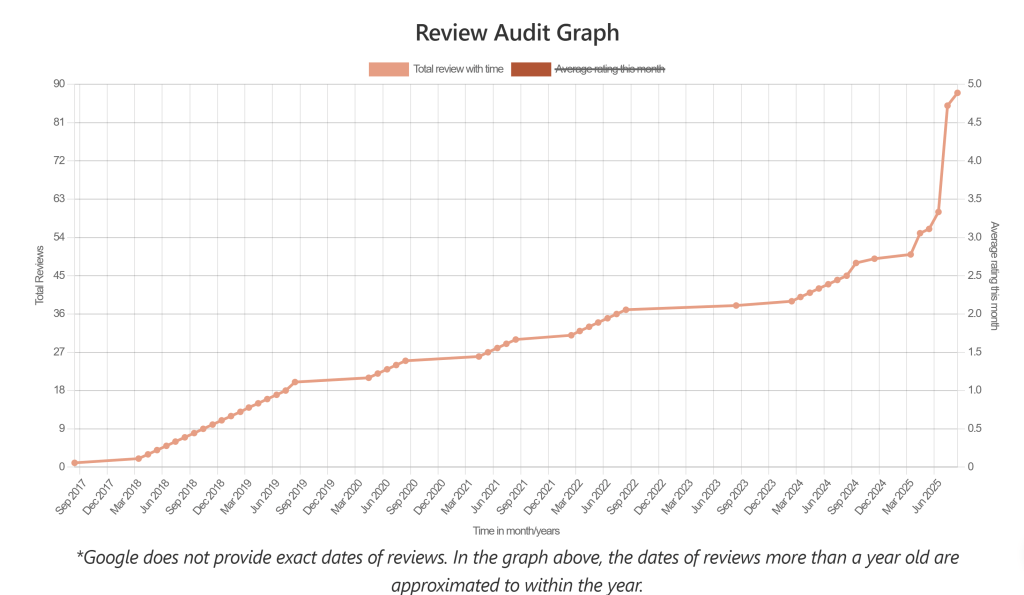
We recently implemented this system for a law firm that started with 49 reviews on their Google Business Profile. Just three months later, they have 88 reviews—and a steady stream of new reviews weekly.

And here’s the kicker: their entire client list was under 1,000 contacts.

This isn’t theory—it works. And today, we’re giving you the exact email swipe file and flow so you can set it up yourself.

Why Automating Review Requests Works

Consistency – every client gets asked, not just the ones you remember.

Segmentation – old clients get reactivated, while recent ones get nudged at the perfect time.

Leverage – once it’s running, it works for every future client without extra effort.

The chart below shows the client’s GBP reviews over time, highlighting the effectiveness of the Review Getter Email automation.

Mapping Out the Automation Flows and Triggers

Determining how to trigger your flow

  • Tag clients in your CRM as recent or not.
  • CRM should be integrated with your email system or contain its own email.

—–

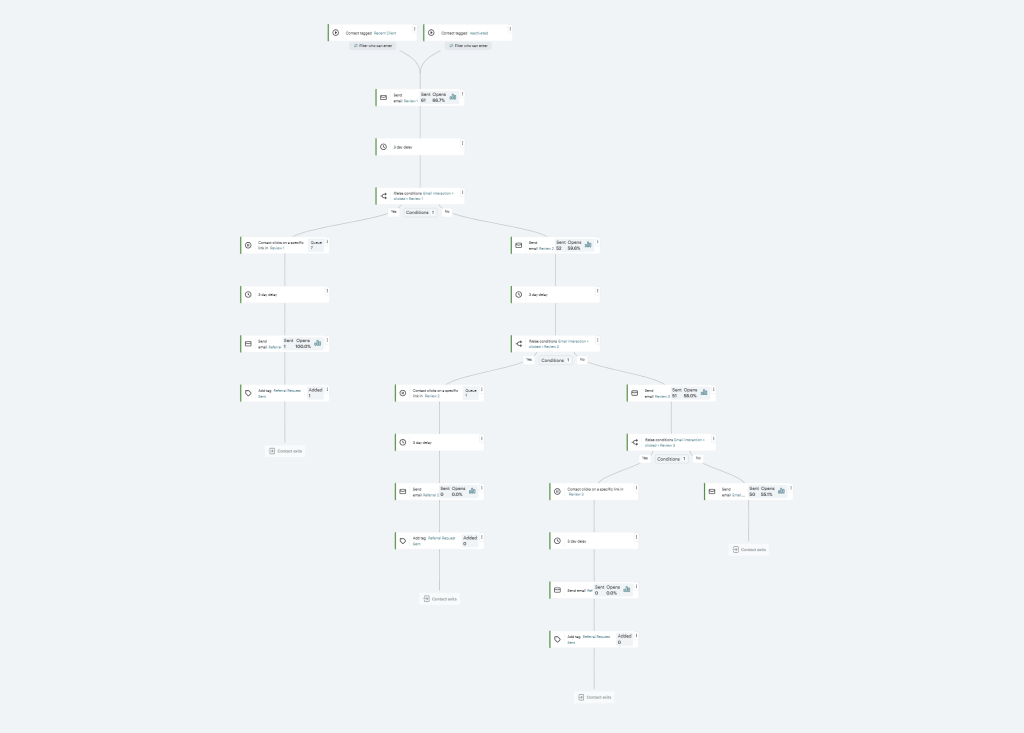
  1. Set up the Reactivation first and trigger by your not recent tag.
  2. Set up Review automation and trigger for a recent tag.


  • Reactivate email is sent to old clients
  • Engaged old client (opens the email) moves into review automation
  • Positive review click moves into referral request


Step 1: Reactivation Email (for past clients)

Trigger: Clients who haven’t engaged in 6+ months.

Open Rate: 37.7%

Subject: You’re Invited – [Customer Appreciation Event]

Hi <<First Name>>,

We hope you’ve been doing well! It’s hard to believe, but 2025 marks __ years since we opened the doors at__. We couldn’t have reached this milestone without the trust and support of clients like you.

As part of the celebration, we’re planning [a small event to honor our community] and reconnect with past clients. We’d love to see you there — just reply to this email and we’ll send you the details soon.

In the past year alone, we’ve helped:

<results or outcomes>

<results or outcomes>

Whether you have a question, need a referral, or just want to say hello — we’re always here.

And if you know someone looking for a __ in __, we’d be honored to help.

Warm regards,

Conditions –> anyone who opens the email is sent the Review Request Flow Flow:

Step 2: Review Request Flow (for recent & reactivated clients)

Review Email #1 – How Do You Rate Our Service?

Open Rate: 66.7%

Hi <<First Name>>

At __, we’re committed to providing outstanding __. 

Your feedback helps us continue to grow and serve our clients with the highest level of care.

Please take a moment to share your experience with us. Your response helps us improve and ensures we continue delivering the kind of ____ care that makes a difference.

Thank you for your time and continued support.

Tell us how we did

Please click the thumb up or thumb down button below:

  • The thumbs-up button links directly to open their GBP Review URL.
  • The thumbs-down button is gated and goes to a feedback form with a confirmation message.


Conditions: Wait 3 Days

→ Clicks on the thumbs up link in the Email → Goes to a Referral Flow – see further below for that swipe file

→ Does not click on any links → Gets Review Email #2

2 Ways to Find the GBP Review URL

1. Go to Place ID Finder and search for the GBP in question.
2. Copy the ID
3. Paste the ID at the end of the following URL:

				
					https://search.google.com/local/writereview?placeid=ID HERE


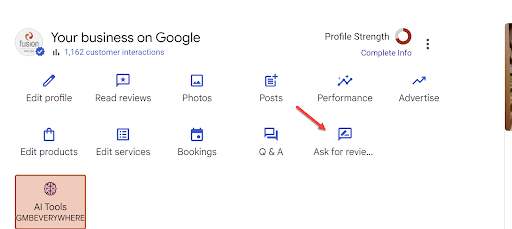
Alternatively you can find your review URL here on the GBP dashboard

Review Email #2

Open Rate: 59.6%

Subject: Help US Improve – We’d Love Your Feedback

Hi <<First Name>>

We noticed you haven’t had a chance to share your feedback about your experience with us. Hearing from our clients is important—it helps us continue to improve and provide the high-quality ___  support our community deserves.

If your experience was a positive one, your review can help others in need of __. And if there’s anything we could have done better, we’d truly value your input so we can make things right.

We read every message and review.

Thank you again for placing your trust in __

Tell us how we did

Please click the thumb up or thumb down button below:

Review Email #3 – One Last Quick Favor

Open Rate: 58%

Hi <<First Name>>,

If you haven’t already, we’d sincerely appreciate you sharing your experience. Your review not only helps others feel confident in choosing us—it also helps us grow and better serve our community.

👉 [Thumbs Up Button → GBP Review URL]

👉 [Thumbs Down Button → Private Feedback Form]

Review Email #4 

Repeat of Email #2

Open Rate: 55.1%

Step 3: Referral Request Email

Trigger: Anyone who leaves a positive review (clicks the thumbs up link).

Open Rate: 98%

Subject: Thank You – and a Small Favor to Ask…

Hi <<First Name>>,

Thank you again for your kind review! We’re so glad you had a positive experience.

As a local __, word of mouth means everything. If you know a friend or family member who might need trustworthy __, we’d be honored to help them too.

Just reply to this email or pass along our info—we’ll take care of the rest.

Thanks again for your support—it truly means the world to us.

All the best,

[Your Name]

Why This Works

  • Multiple touches mean clients are reminded without being spammed.
  • Positive filter directs happy clients to Google, while unhappy clients give private feedback.
  • Referral lift turns reviewers into promoters.

Want Us to Set This Up For You?

You now have the exact review-getting automation swipe file to copy and paste into your email system.

But if you’d rather skip the tech setup and know it’s done right, we offer a Done-For-You Email Automation Setup service.

 Check out our Email Automation Setup Service here

Unlike monthly review management SaaS tools (that can cost you hundreds every single month), our setup is a one-time investment that keeps running forever.

Set it up once → let it collect reviews, referrals, and repeat business for years.

Final Thoughts

If you’re serious about growing your local presence, reviews are the most powerful ranking signal on Google Maps. Automating your requests ensures you never leave them to chance.

Use this swipe file to build your system—or let us build it for you, so you can focus on running your business.


👉 Get your email automation set up once and for all

Facebook
Twitter
LinkedIn

Leave a Reply

Your email address will not be published. Required fields are marked *

Leave a Reply

Your email address will not be published. Required fields are marked *

Try the Free Nested Schema Markup Generator

Subscribe to the Free Email Mini Course

This 8 Part Mini Email Course will Take You from Schema Rookie to Schema Pro in 8 Days

Let’s Talk About Your Local Marketing

Ready to take your local business to the next level?

Contact us today and see how Chaz Edward Local Marketing can help you achieve your goals with proven SEO strategies tailored to your needs!

Give your brand a boost today!

Find out exactly what it takes to rank in Google Maps, Local Search, and Increase your Local Company’s Online Visibility

Request a Free Digital Marketing Audit and Custom Strategy

Please allow up to 5 business days for the completion of your audit and custom strategy

Local SEO Audit & Strategy Call

After you complete this form you’ll be prompted to schedule a Complimentary Zoom Strategy Session with Chaz